
Active software
Focused desktop tools that improve organization, visibility, and everyday computer workflows.
Explore File Vault →Automation Software Tools is an independent development studio creating custom websites, web applications, desktop utilities, and experimental software with a focus on useful workflows and clear interfaces.
Built and maintained by Ryan Caldwell.
Focused desktop tools that improve organization, visibility, and everyday computer workflows.
Explore File Vault →Responsive websites and custom web applications built around the actual purpose of the project.
View services →Earlier prototypes remain documented as part of the development history rather than presented as current products.
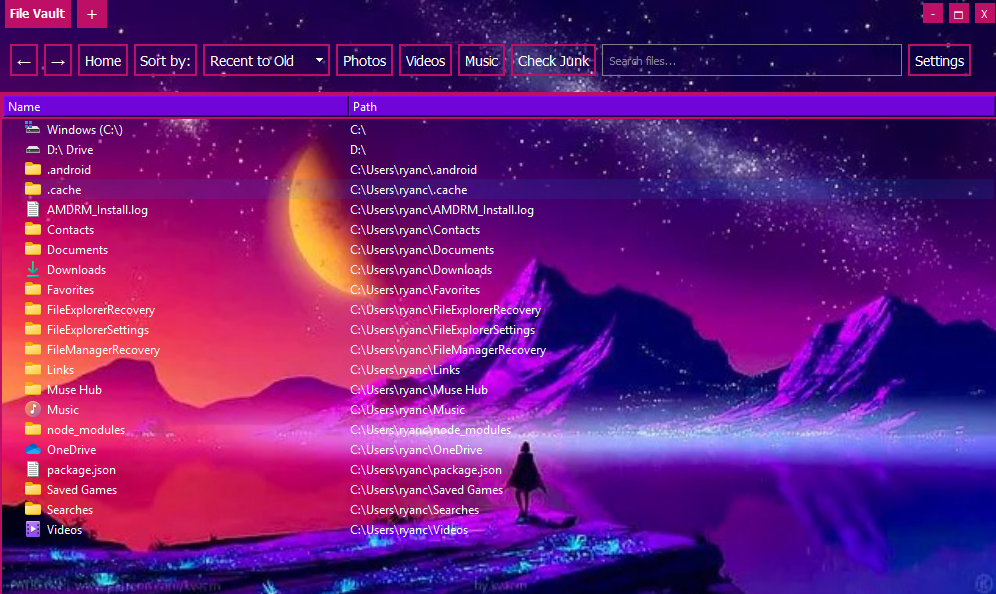
Browse the archive →A streamlined file-management companion designed to make storage easier to understand, sort, review, and clean than a conventional file browser.
Web development
Each project begins with what the site or tool needs to accomplish. The design, structure, and functionality are then built around that purpose.
Clear, responsive websites for businesses, organizations, services, personal brands, and public-facing information.
Schedules, ticket links, performer information, announcements, sponsors, galleries, and visitor resources.
Dashboards, internal tools, databases, schedulers, catalogues, simulations, calculators, and specialized systems.
Modernizing older websites, correcting layouts, improving mobile support, and adding new functionality without rebuilding more than necessary.
Selected work
The catalogue includes public websites, data platforms, private applications, and browser-based experiments.
Prospect rankings, lottery simulations, mock drafts, team-selection tools, draft-order tracking, and a statistical database in one connected platform.
An event-focused website organizing festival information, schedules, ticket access, performers, announcements, and promotional material.
An in-production programming-language platform designed to help users compare languages, understand their uses, and choose a practical path forward.
An in-production isometric kingdom-building game with resource systems, construction, progression, chat, quests, and a persistent medieval interface.
Development archive
These projects are no longer presented as maintained products, but they remain useful examples of earlier technical exploration.
A screenshot-driven desktop automation agent that explored visual reasoning, iterative task execution, persistent summaries, and autonomous workflow control.
Development paused as general-purpose computer-use agents became widely available from larger platforms.
A multi-window browser workspace with embedded Chrome sessions, tiled layouts, persistent profiles, popup controls, and per-window audio management.
Browser changes disrupted the embedded viewport, while newer native browser features reduced the original need.
A voice utility combining speech recognition, text-to-speech, translation, global hotkeys, device selection, and virtual audio routing.
The hosted demo was retired because it relied on paid Azure and ElevenLabs services that are no longer being maintained.
Project process
Explain the goal, audience, required features, existing materials, and desired timeline.
The project is broken into clear requirements, priorities, technical needs, and an agreed estimate.
A working version is developed and refined through practical review rather than vague design promises.
Final deployment, correction, and follow-up work are handled according to the needs of the project.
Start a project
Share the purpose of the project, the expected timeline, and the most important features. Pricing is based on scope, complexity, content requirements, and the amount of custom development involved.